


 View Cart
 Search Our Site
 Products
 Knowledgebase
 Company Info
 Contact Us
 Help
HelpTelephone Ring Voltage Tech Bulletin
In the old days (a few years ago?) we primarily dealt with ringing from real phone lines. Sometimes we'd have to deal with a channel bank or station port on a phone system, but ringing wasn't much of a problem. The ring voltage was pretty similar, and most of us never had to worry about or measure it.
In general, ringing coming from every real phone company Central Office looks pretty much the same (but true rural phone companies can do whatever they need to). It's around 90VAC at 20 cycles per second, with a true sine wave, at about 5 REN.
Ringing coming from "fake" phone lines can look very different from manufacturer to manufacturer, or even from model to model. Channel banks, VoIP Analog Telephone Adapters (ATAs), cable company phone gizmos, and analog station ports on phone systems all ring, but there's no way to know how a particular engineer decided to make it ring.
Because these devices only give you "fake" dial tone, the manufacturers don't have to follow any standards or regulations. Today's inexperienced engineers are told to do it the fastest, easiest, and cheapest way possible. Often the engineers designing this stuff have never even used a real phone line - they might have a simulator and a couple of books. If every piece of phone equipment looked the same, that wouldn't be a problem. The reality is that different makes and models of phone equipment look very different today. Because most of the phone equipment sold in the US today is made in China or Europe, very little looks like the old equipment we used - even three years ago.
A lot of the phone systems and phone equipment used in the US are made for European standards - which although similar, are different enough to cause big headaches for telephone men trying to hook this stuff up here in the US. In Europe, 60VAC ring voltage is common, so in many cases US phone equipment connected to phone system station ports that were designed in Europe just don't work well (because they're looking for a minimum 75VAC ringing).
In the old days (in the US) ringing was 2 seconds on, and 4 seconds off. Then distinctive ringing from the phone company became commonplace, which offered shorter rings. PBX station ports have often had shorter rings, with different ring cadences indicating an inside or outside call. The ring cadence is also different in Europe. There's a possibility that the station equipment you're installing won't recognize a distinctive (or short) ring.
Your assignment, should you decide to get paid, is to figure out why the stuff doesn't work - and fix it.
The easiest thing to fix is ringing that's too short for the telephone equipment to recognize. A common fax switch usually puts out the standard 2 seconds on / 4 seconds off ringing, as long as it recognizes the ring. There's a pretty good chance that sticking a fax switch between the line with the short ring cadence and the telephone equipment will fix the problem, but it will likely delay ringing for one or two rings and will probably eat the Caller ID signal - which normally comes between the first and second ring here in the US. It's an easy thing to try to get you going in the right direction.
AC (Alternating Current), which is used for ringing, means the voltage goes positive, to zero, and then negative by the same amount over a given period of time (for a phone line ringing at 20 cycles, there are 20 complete cycles per second).
If it's a sine wave, the voltage tapers from positive to negative, making a waveform that looks rounded at the tops and bottoms (see the chart below).
If it's a square wave (which is cheaper to make electronically), the voltage goes straight up to the maximum positive voltage, stays at that voltage for the duration of that part of the cycle, and then goes straight down to the maximum negative voltage (see chart below). On a square wave, the line going from positive to negative is usually vertical, as opposed to sloping on a sine wave.
Some real bells (ringers) have a problem with square waves, so some manufacturers shape the waves into trapezoids (with extra electronic components) to improve how their device works with real bells, and to reduce some of the noise that can be generated by using a square wave (see the chart below). Most electronic ringers work fine with a square wave.
The reading you get with a particular meter on ring voltage depends on the waveform type. See the chart below.
It's unlikely that any two of us will get the same reading measuring the same ring from the same source, since we all carry different makes and models of meters. That makes tech support pretty difficult and makes it important that you use your meter to take readings at lots of customers where you're not having a problem - so you have a good feeling about what's normal and what's not. It's impossible to use your meter for the first time where you're having a problem (to make a diagnosis), since you'll have no basis of comparison.
Even worse is that many modern meters, even expensive True RMS meters, won't read AC voltage on a DC telephone line. I guess the inexperienced engineers who designed this stuff just never had to work with phone lines, or measure AC hum on a DC power supply?
When you try to measure AC on a phone line using one of these screwed up meters, the display will hunt all over - like from 30 to 100 to 60 to 200 to 100 to 80, etc. If your meter hunts when you put it on the AC scale on a phone line, you need to get a different meter. Since you can't test a meter before you buy it, that's sometimes hard to do!
A phone man has to be able to measure AC on phone lines these days! Besides ring voltage, a phone man has to be able to measure the induced AC on a phone line. When the AC, measured from tip to ground or ring to ground is over .5VAC, strange things start to happen on phone systems and devices that have a reference to ground (AC powered). Battery operated devices with no reference to ground are usually not affected by AC on the phone line.
If your meter starts hunting as soon as you put it on a phone line on the AC scale, you won't be able to check for induced AC or ring voltage. For an explanation of problems that can occur with induced AC, see our Longitudinal Imbalance Tech Bulletin.
| Meter Comparison Chart for Various Waveforms | |||||||
| Waveform | Waveform Type | Voltage Source | Scope | Triplett Model 5 | Model 77 | Model 179 (True RMS) | Sidekick T&N (Analog) |
 |
60 Cycle Sinewave | 120VAC Power | 125.0 VAC RMS | 124.0 VAC | 125.3 VAC | 123.6 V RMS | 110 VAC |
 |
20 Cycle Sinewave | CO Line Ringing | 106.0 VAC RMS | 70.4 VAC | 71.0 VAC | 84.0 V RMS | 68 VAC |
 |
20 Cycle Squarewave | PBX1 | 86.6 VAC RMS | 74.8 VAC | 81.5 VAC | 61.6 V RMS | 74 VAC |
 |
20 Cycle Trapezoid | CallVantage VoIP | 70.7 VAC RMS | 61.7 VAC | 62.6 VAC | 79.0 V RMS | 44 VAC |
 |
20 Cycle Squarewave | Fax Switch | 70.7 VAC RMS | 62.1 VAC | 67.0 VAC | 64.2 V RMS | 50 VAC |
 |
20 Cycle Trapezoid | Sunrocket VoIP | 70.7 VAC RMS | 53.1 VAC | 54.4 VAC | 53.7 V RMS | 46 VAC |
 |
20 Cycle Squarewave | PBX2 | 60.0 VAC RMS | 52.0 VAC | 60.9 VAC | 57.0 V RMS | 40 VAC |
|
Notes: 1. All Ring Voltage readings taken with a 1.4 REN Load 2. Scope readings are calculated RMS 3. Model 179 is a True RMS meter 4. All other meters read Average AC (the Sidekick is analog) Copyright © 2026 • sandman.com, Inc. |
|||||||
Looking at the above chart convinced me that taking AC ring voltage readings can be a real problem. Some phone equipment won't respond to a 60VAC ring. Some won't respond to a 40VAC ring. Since any two models of meter could read a 10VAC or more difference, that makes troubleshooting pretty hard!
If you already have a meter that works, your best bet is to use it to take readings on many different CO lines, VoIP lines, cable lines, and analog station ports, as you come across them. Make yourself a little chart with all the readings. When you come across a ringing problem, you'll be able to compare the readings on other systems to the one you're having the problem with, as a sanity check.
If you use the meter for the first time at the premise where you have a problem, you have no basis for comparison and you really can't trust the readings you’re getting (and the readings aren't particularly useful to a tech support guy, unless he's familiar with that particular model of meter on that particular type of phone system).
Voltage and waveform is only half the equation in dealing with ringing problems. The amount of current that the phone equipment uses, and the amount supplied by the line (or equipment supplying the ringing) can also cause problems. Since most people would have a hard time measuring AC ringing current with a meter, the phone company came up with the REN (Ringer Equivalence Number).
1 REN is the amount of AC current that’s used by an old Bell type 2500 set with mechanical bells. The phone company has traditionally supplied about 5 REN from the CO - enough to ring 5 of the old-fashioned phones. Since AC ringing current is limited at the CO, if you put 6 REN worth of phones on the line the ringing will either stop on all of the phones, one or more phones will sound very weak, or some phones will ring, and some won't.
If you have a meter that will read AC current on a phone line (AC ma), you can use an old 2500 set, which uses 1 REN of current, to measure how much current it takes to ring the bell on that set on your meter. Once you know how many ma of current it takes for 1 REN, you'll be set to figure out how many REN a particular phone takes, or how many REN a phone line provides (before it stops ringing).
Using an analog port on a PBX in our office, we used the Network Meter to measure the current it took to ring an old AT&T 2500 set. It took 8.75ma AC. Then we measured the current it took to ring a Chinese phone we sell. It measured 8.26ma AC, but the phone said 1.4 REN on the label (if it was really 1.4 REN, it should have read 12.25ma AC). I guess I'll believe the meter, and figure that each of these phones is really a little less than 1 REN.
We then kept bridging more Chinese phones to the PBX analog station port. It stopped ringing when we plugged in the fourth phone, which means that particular station port provides around 3 REN of ringing. When you put 4 REN on the port, the electronics in the PBX shuts down the ringing. The same thing would happen on a POTS line from the Phone Company, at about 5 REN.
Now, picture switching from the real phone company to a VoIP or cable phone company, where the ringing comes out of a box connected to the Internet or TV cable. Some of those boxes supply 5 REN, but some of them supply only 1 or 2 REN. That means that although the phones all rang well from the phone company before, they'll stop ringing when the ringing is coming from the VoIP device if it supplies less than 5 REN (unless you unplug some phones?).
You'll find specific instructions on measuring REN yourself a little farther down the page.
The REN number is printed on the bottom of most phones, but newer products might show the REN number inside the FCC registration number. In the registration number US:AAAAAnnBXXXXX, nn is the REN times 10. Just think of it as n.n REN.
If the registration number is US:1X23T07A12345, the REN is 0.7. In the new style FCC registration number, there are 5 characters after US, then the 2-digit REN without the decimal point. The letter following the REN is almost always A, B or Z.
The REN on telephone equipment can be as low as 0.0 REN (it uses almost no ringing current), or sometimes as high as 2 or 3 REN (usually older equipment).
If the phones don't ring properly, add up the REN numbers on the bottom of everything plugged into the line, and make sure it's less than 5. The problem is that if it's not a real phone line, you probably have no way of knowing how many REN the device puts out, unless you measure it yourself. Some VoIP and cable devices put out 5 REN of ringing, but most put out less. Unplug the phones, one at a time, until the ringing starts to work. Few (if any?) analog station ports on phone systems put out 5 REN.
So how many REN will a particular device that provides ringing provide? If it doesn't say in the manual or on the box, you'll have to call tech support (which could be very frustrating if it's a VoIP or cable company!) or calculate it yourself.
One thing to be aware of is that the more REN (ringers) are on the line, the lower the voltage is going to be when you read it with your meter.
The readings on the above chart were taken with phones totaling 1.4b REN on the line. The voltages would be higher in all cases with no telephone equipment connected to the line - just the meter. With 5 REN worth of phones connected, the voltages would be quite a bit lower. If you're going to take readings, it would be best to compare apples to apples, and disconnect the inside wiring when you measure ring voltage.
If you're close to a CO or SLC, the AC ringing current can be higher than normal, just like the DC loop current. The phone company wants to make sure the pairs will work as far away from the CO or SLC as possible, so they leave everything cranked up. They usually won't adjust it down if you ask them, since there's no procedure to adjust it back up when that subscriber cancels and the line card is used for a different subscriber (who may be farther away from the CO).
Like high loop current, high ringing current can damage components on a CO line card (usually through heat). If a premise is near the CO or SLC, it's likely to have both high DC loop current and high AC ringing current. Our Loop Current Regulator™ reduces both the DC loop current and AC ringing current, so it's definitely something that needs to be installed if the loop current is high (some NT CO Line cards have a problem with trunks burning out and going low volume if there is high ringing current on the line).
You could reduce the AC ringing current getting to a phone system by putting maybe four 2500 sets bridged onto the line with the phone system. The bells in the phones will use some of the current that would otherwise go into the CO line card and damage the components. That still leaves you with high DC loop current, which will also damage the CO line card, so a Loop Current Regulator™ makes more sense than screwing around bridging phones to the line.
Measuring the REN of all the phones on the line, or the available REN on the line, yourself...
You measure how many REN worth of phones are on a particular phone line with a digital meter that reads AC current (ma). Just find an old real ITT or AT&T 2500 set with a double gong ringer. The oldest phones won't have a REN number on them, but the old double gong ringers are the gold standard that created the REN measurement. One double gong ringer is 1 REN.
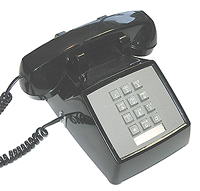
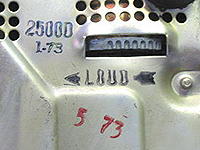
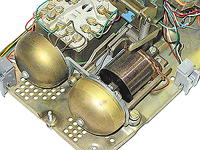
1. Put the old phone on a real phone line (don't use a station port or VoIP ATA since it might not put out enough current to ring one phone).
2. Put your meter on the AC ma scale (not DC). Your meter may have a different banana jack for the red lead to measure milliamps, or maybe just for AC milliamps. Be sure to look at the designations on the meter's jacks!
3. Put the meter leads in-series with either the tip or ring going to the phone. It must be in-series, not in parallel (which will short the line) to measure the current traveling to the phone. If you put the meter in-series with the tip, the current will come out the tip side of the phone line, in and out through the meter leads to the tip connected to the phone, through the phone and back to the ring side of the phone line.
4. Call the phone line, and you'll see the current it takes to ring the old 1 REN phone (attached in-series after the meter) displayed on your meter.
5. The reading you see will be the amount of current your meter reads for 1 REN. Record that number, because that's going to be the current for 1 REN that you're going to use to calculate the REN of phones attached to a phone line, or how many REN the phone line is capable of supporting.
6. To measure the REN of all the phones on a phone line, connect your meter in-series with all the phones, ring into the line and observe the ma reading on your meter. The more phones that are attached after the meter, the more ma (current) you'll see.
7. When you get the reading for all the phones, divide it by the reference number you recorded for 1 REN. That's how many REN the phones are using on that phone line (like 20ma divided by 8.2ma = 2.43 REN)
Your meter may show 8.75ma AC with an old 2500 set. If you put four 1 REN phones on the line and they all still rang, your meter would show 35.0 ma.
When you add the fifth phone, the ringing may stop on all the phones because ring current is regulated at about 5 REN from the phone company. When you draw too much ringing current, you'll see the current drop back down ("fold back") to maybe 10ma - in which case none of the phones will ring because there's not enough current.
Adding a load (like one phone at a time) and measuring the amount of current the phones are drawing after you add each phone is the only way to measure the available ringing current on a phone line or station port. You can't measure the available REN on a phone line or station port by simply putting the meter's leads on the tip and ring while the line is ringing, since the meter will short the line and answer it as soon as you put it on the line.
The only way to measure available REN is to know what your meter reads for 1 REN (above), then continue to add phones until the ring current folds back - and the phones stop ringing.
Adjusting an old 2500 set ringer to ring on lower voltages...
The old 2500 sets with double gong ringers, and 2554 sets (wall phones) with single gong ringers, have a small bias spring to adjust the clapper on the bell. The bias spring was normally shipped in the high position so the bell wouldn't tap when a rotary phone was dialed, or another phone went on and off-hook - which can put out a spike that's enough to move the clapper a little.
If you have less than the standard 90V AC ringing and would like to make an old-style phone ring, you could try setting the bias spring to the low position to see if it rings.
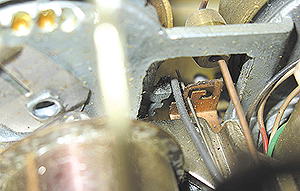
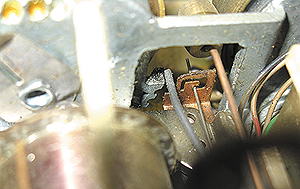
Modern phones with real bell ringers probably don't have a bias spring. The Chinese do a good job copying stuff, but I'm pretty sure they had no idea what that wire was for... so they never designed it into the cheap phones they make. Too bad, since most of the stuff they make has pretty crummy ring voltage.
If a phone doesn't ring with a fake phone line, try this...
Some phones say 0.0 REN on the bottom of them, which essentially means they don't take any current from the phone line when ringing. If your phone says 0.0 or maybe 0.2 REN, try bridging a second phone that says 1.0 or so REN onto the pair.
Some fake phone lines won't put out any ringing if they don't see any current being drawn. This includes VoIP ATAs (Analog Telephone Converters) and analog ports on phone systems.
Boosting the Ring Voltage and Ringing Current if it's low...
If you aren't getting a high enough voltage or enough REN from the device supplying the ringing, we sell Ring Voltage Boosters™:
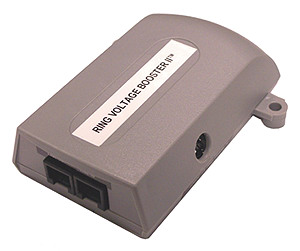
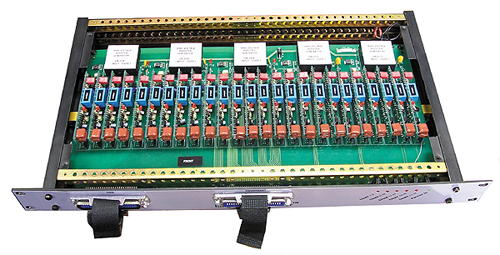
Our Ring Voltage Boosters™ plug into an AC outlet and go in-series with the device that's providing the ring voltage and the telephone equipment. The Ring Voltage Booster II™ and 25 Line Ring Voltage Booster™ put out 90VAC RMS at 7.5 REN with a true SINE WAVE.
The Ring Voltage Booster II™ and the 25 Line Ring Voltage Booster™ can boost ring voltage as low as 30VAC RMS.
If you need to supply 8 REN, you would split the stations so that half would be connected directly to the phone line (with the input to the Ring Voltage Booster™), and half would be attached to the Ring Voltage Booster™ itself.
You can see lots of information on testing and fixing telephone line problems in our Knowledgebase.
If you look inside most modern meters, there's almost nothing in them. Besides the fact that all of the components are surface mount (which are very small), the bulk of the features are controlled by an ASIC (Application Specific Integrated Circuit ), which is a microprocessor with everything pre-programmed, and then stuck on the board... they don't buy an off-the-shelf microprocessor from a company and burn their program into it. An ASIC usually looks like a blob of black glue stuck to the board, which is protecting the actual microprocessor and memory (you see a similar thing in one of those greeting cards that plays music).
Why 90V Ring Voltage?
A lot of guys wonder why the phone company uses 90VAC at 20 cycles, and the power company uses 120VAC at 60 cycles? Why doesn't the phone company use 120V at 60 cycles? Well, phones became popular before the power companies used AC voltage. Edison's first power plants were DC, not AC. Eventually Edison's competition forced him to use AC, which turned out to be much easier, cheaper, and safer to distribute in towns than DC.
The original phones used a crank on the side which ran a small magneto to send the ringing signal to the other end of the line (normally the phone company's switchboard). 90 Volts AC at 20 cycles were reasonable numbers considering that a human had to spin the crank by hand, and the bell was a big clapper that had to swing up and back to hit two gongs (if it went too fast, you'd get a clapping or buzzing rather than a ringing sound).
Switchboards often used "drops" in addition to a bell or buzzer, which were little spring-loaded doors that were released by the ring voltage sent from the magneto on the calling phone. Later switchboards had lights next to the jack for each subscriber, instead of the mechanical drop.