


 View Cart
 Search Our Site
 Products
 Knowledgebase
 Company Info
 Contact Us
 Help
HelpMagic Jack Tech Bulletin
NOTE: Our company supplies telephone equipment to telephone installers and IT professionals. We DO NOT sell or support the Magic Jack, but we do sell some products that can work with the Magic Jack to solve particular problems. In general, we don't recommend the Magic Jack for anything other than a cute inexpensive toy.
WE DO NOT RECOMMEND USING THE MAGIC JACK FOR BUSINESS LINES!
The original regular Magic Jack (no longer sold) is a little dongle that plugs into a USB port on a PC and uses software on the PC to give it the smarts to use the Magic Jack VoIP service.
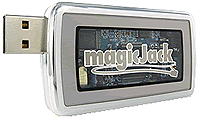
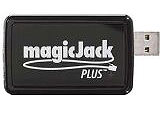
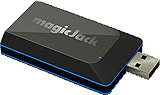
The current regular model (at this writing) is the black Magic Jack GO 2014, and the white Magic Jack EXPRESS 2015, which is similar to the older silver versions and the previous smaller PLUS version. You can plug it into an Ethernet port on your home router. No PC is needed (but you can still use one if you want). It's a little bigger plastic box than the original silver versions and comes with a little power cube to power it (not all USB ports are created equal, and sometimes USB port power availability caused problems on the older versions). All the smarts necessary for it to work are in the unit itself. You never have to plug it into your PC, even to set it up.
The technical numbers comparing versions of Magic Jack are towards the end of this Tech Bulletin.
My magicJackGO didn't work right out of the box...
I was able to receive a call on the Magic Jack GO (the caller said it sounded OK), but I couldn't make a call. Nothing happened when I was done dialing. Just silence dialing any phone number.
For troubleshooting, I unplugged the GO and plugged a PLUS 2014 in exactly the same way, and I could make a call. I plugged the GO back in, and still couldn't make a call (could only receive calls).
I hadn't tried to chat with their customer non-service for a few years, so I gave it a try. I could feel my blood pressure going up through the whole thing, but they did get it working within about 10 minutes. The chat person typed that they reset something on their end and had me unplug the GO for a minute (I unplugged both the power cube and the Ethernet patch cord). They did get it working! After that I could make and receive calls OK. It did take a while for my blood pressure to come back down.
Technically, the Magic Jack is amazing. As a phoneman, I think the engineers who've designed all the Magic Jack versions are brilliant. They've made it better with every new version. As a hardware device the little Magic Jack dongle is designed and made well.
They now only deliver voice-mail messages by email (you can listen to the wav file on your computer or smartphone). There was no indication that I had a message waiting on the phone itself.
They now include a free smartphone / tablet app that lets you make and kind of receive calls using the same phone number as assigned to the Magic Jack. If you are connected to Wi-Fi, you can now make calls on your Magic Jack from your smartphone or tablet. Sounded OK on the one call I made. Incoming calls are probably not reliable using the app.
Making the calls through a 3G data connection on the smartphone or tablet might not work well. Better to use Wi-Fi.
The Magic Jack phone service and the Magic Jack customer service are another story. That's what will make you hate them if you ever have a problem. If you never have a problem, you'll probably like it. If it breaks or stops working, buy another one and get a new phone number. Don't waste your time with their "customer service" chat unless you have a good supply of Valium handy.
Lots of reviews on the Internet say that sometimes you can't renew service on the older models. You may lose your phone number when they force you to get the newest model to continue using a Magic Jack. That's mainly because they have no support, and the third world country where they try to provide support (through "chat," not by phone) has totally untrained people "trying" to help you.
This is the message you get when you register your Magic Jack that makes you agree that if you don't use Auto Renew you may not be able to keep your phone number:
IMPORTANT: Auto Renew also guarantees that you can keep the same phone number year after year. By not choosing Auto-Renew, you may be required to choose a new number upon expiration (you can disable Auto-Renew at any time at my.magicjack.com). Don't forget, when you enable Auto-Renew you also receive a FREE magicJack Lifetime Warranty (a $20 value), absolutely FREE.
There are reports on the Internet of Auto Renew not working properly, and you lose your number anyway.
Note that if you accidentally hit that you want Auto Renew while setting it up, there is no way to go back and say you don't want it - unless you start the whole process over from the start on their registration website. They really seem to want to get your credit card number!
The Internet is full of reports that Magic Jack is less than honest and steals your money when they get your credit card. For me, they "Auto Renewed" a Magic Jack that I don't use, that I don't want, that's broken and unusable, that there seems to be no way to stop "Auto Renewing."
I only used a credit card to renew one Magic Jack for one year, once, in 2013. I had just noticed a charge to my credit card. I did not check to auto renew, but Magic Jack charged my credit card anyway. I also got the following email on 7/31...
Note the $2.73 "Administration Fee" in addition to the $35.00:

There was no way that I could find to change or cancel the "order" by clicking on anything in the email, or looking on their website (I went all the way through the many pages of their FAQ).
I don't actually know what the message about Debit Cards at the end of the above email means. They don't seem to like Debit Cards for some reason. Maybe it's easier for someone to dispute a dishonest charge?
I was in a hurry to do some testing on the first Magic Jack PLUS in 2013 and went against my own advice of not giving Magic Jack a credit card number (just buy a new one at a store to "renew"). So now I've got to do a chargeback through the credit card company (not fun!). That Magic Jack actually broke during testing anyway (the plastic cracked so the modular phone plug won't stay in the jack, but they don't make that version anymore).
Note that the email included an order number (that I erased), but there's no Magic Jack phone number associated with it, and no way to find the phone number the charge is for. I have a box full of Magic Jacks that I don't use (I bought one of each version for testing). I just happen to remember that I renewed one of them.
NOTE: It didn't say that I had any option in the email, but I gave it a shot and replied to the email telling them to reverse the charge. I got an email back that gave me instructions to find a hidden "Auto Renew" button on their website (it was very difficult to find!), and to "get back to them" after I turned off "Auto Renew." I followed the instructions and replied and got an email back saying that my card wasn't charged (but it was). Try replying to the email if you get the same kind of email from them?
The customer service people are given almost nothing to work with but a useless script. I doubt they've ever used a Magic Jack.
Magic Jack is pretty clear on their website that they are selling a little toy. They don't suggest you try to make it work with all the phones in your house, and they don't support using it with all the phones in your house.
They aren't going to let you game their "unlimited" calling. They make it very clear it's just a toy for personal use. Not for calling someone and talking for many hours, using it to make or receive calls for business purposes, or calling conference lines (you can pay extra for that).
The newest magicJackGO and EXPRESS models say it comes with a "conference phone number" to use for free. I haven't tried it.
If you're trying to make the Magic Jack work with all your phones, you're essentially a hacker (hobbyist?). It's likely that you can get it to work with quite a few phones, but it would take some effort and a couple of hundred dollars.
It's always fun to beat the system, especially when the system (your local phone company) is charging you a fortune for your service. The local phone company is making us all want to get rid of our real phone lines (they usually do it on-purpose). The problem is that they have a large infrastructure to provide phone service that is close to perfect 100% of the time. Even during storms and power outages. Cell phones and any VoIP service are much less dependable.
That said, if you have a cell phone and you can live with the Magic Jack not working now and then, and poor voice quality sometimes, it's a good choice for your house for casual use. It's very neat to take it to another country and have a US phone line anywhere you can get reasonably fast wired Internet (not Wi-Fi).
It doesn't make sense to give out your Magic Jack number for business because it's likely to get changed, and there's nothing "customer service" can do to get it back for you (I did read a comment that they will sell you back a phone number you lost for $30, but that's unconfirmed).
It makes even less sense to port a number that's important, and/or that you've have had for years, over to Magic Jack. You are likely to lose it and there's nothing "customer service" can do to get it back for you. There is nobody you can talk to or complain to, no matter what.
The black Magic Jack PLUS, Magic Jack PLUS 2014 , magicJackGO and white magicjackEXPRESS plug into a USB port on a PC with an operating system that it supports (Windows XP, Vista, Windows 7 & 8.X, and Intel MACs), or you can plug it directly into an Ethernet port on your network switch or router.
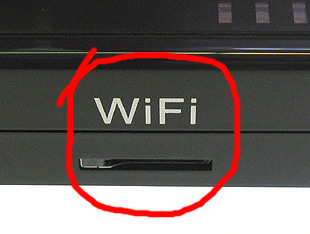
The Magic Jack PLUS 2014 says WiFi on the side, but at this writing it won't work with Wi-Fi at all. It needs to be plugged into the USB port on a PC, or into the Ethernet port on a router or switch. The slot is likely for a Wi-Fi device that they'll sell to plug into that slot. Maybe it didn't work right or whatever, but in any case, they aren’t saying anything about it. If it works with Wi-Fi someday instead of plugging it into a router, that will be neat.
The Magic Jack PLUS 2014 also has two USB jacks (in addition to the USB plug) on the side, but they do nothing at the time of this writing. They obviously have plans to make the device even neater than it already is. Whatever they come up with might not work great, but they do have really neat ideas.
They may have gone to the newest magicJackGO because they've abandoned the idea of WiFi and the USB ports? Those ports aren't on the somewhat smaller and sleeker looking magicJackGO or magicjackEXPRESS.
You can setup the Magic Jack PLUS 2014, GO or EXPRESS by plugging it into a computer or by plugging it into an Ethernet port on a router or switch on the same network as the PC you use to register it on the web.
When you register without plugging it into a PC (plugging it into a router port) they seem to detect that the Magic Jack PLUS 2014 or GO / EXPRESS and your PC are on the same IP address on the Internet, so you don't have to enter anything on the Magic Jack to get the phone number you're assigned onto the device. It took a few minutes before the Magic Jack was recognized by the Magic Jack registration website. They tell you to plug it into the USB port on your computer if it's not recognized, but you can keep trying. Or just wait five minutes after plugging it into the Ethernet port before trying to register.
Since they try to automatically setup your Magic Jack PLUS 2014 or GO / EXPRESS for you, there seems to be a problem registering a new Magic Jack when you have other Magic Jacks already in use on the network. You might want to disconnect any other Magic Jacks while you're registering a new one. Once it's registered, it seems like you can run as many as your broadband bandwidth will support (about 128K in each direction, per Magic Jack).
If you have a problem anywhere along the way, there may not be a way to resolve it. Don't get your hopes up too much!
Keep in mind that Magic Jack may decide to make you listen to a commercial before completing your call. This is from their Terms of Service:
"YMAX Communications Corporation may be the provider of outbound calling services to subscribers on traditional telephone or wireless networks in the United States, or for toll free calls, and/or for international calls. magicJack LP, YMax Communications Corporation and/or magicJack VocalTec Ltd. may supply various messages of different lengths before your call is completed."
Some users report that before the 6 months or whatever of service expires and has to be renewed, a 30 second message is played nagging you to renew. Once you listen to the message you can make the call. Reports say that sometimes you pay them, and the nag messages don't stop.
Read their complete and pretty amazing Terms of Service at:
http://www.magicjack.com/tos.html
Note that they really don't want you to read the Terms of Service. Their web developer purposely reduced the css line height for the body of the Terms of Service to make it nearly impossible to read...
There was a note in the box with the magicJackGO that was titled "Installation Help." It said:
"Monthly Maintenance: Unplug your Internet router, wait 60 seconds and turn it back on."
Resetting your Internet router or modem once a month isn't a bad idea, even without a Magic Jack.
Any of the Magic Jacks give you a jack to plug a regular single line analog phone into, to make somewhat unlimited US and Canadian calls for about $35 a year after the first 90 days or year.
As of this writing it's $60 for the magicJackGO with a year of service, and $35 for the magicJackEXPRESS with 3 months of service.
If you take a look at Magic Jack reviews on the web their service is not really unlimited. And they clearly say that in their Terms of Service. You can make all the "free" US calls you want according to Magic Jack, but it is limited. Limited to 2 hours a call (after which they just cut you off). If you make too many calls, they just turn off your service (you apparently have to abuse it a lot). And I saw one review that said they won't complete calls to Alaska (apparently because they don't consider Alaska part of the US?).
I don't know of any truly unlimited VoIP telephone service. Any VoIP provider will drop you if they are losing too much money on you. Considering the low cost of this "unlimited" service, that seems fair to me. There are a ton of crooked companies (cellular, broadband, phone) selling their stuff as unlimited, when it's not. It seems like it's OK to sell stuff using a fraudulent description in the US. It's 100% buyer beware out here!
Keep in mind that Magic Jack is not a "phone company." They try to make you think they are the same as a phone company, but their service will never be like a traditional phone company. But it doesn't cost as much as a real phone line! You literally get what you pay for. A neat little toy.
Keep in mind that there is no customer service phone number for you to talk to someone if you have a problem (not that talking to someone at a real phone company will help you much). Whether you have a problem or not seems to be a crapshoot. Because you can't resolve a problem with your Magic Jack or phone number (that you ported over or that they assigned), there is a likelihood that you will lose the phone number at some point.
Don't give out the number for business use, and don't port your business number to Magic Jack!
There are many reports that the sales tactics of Magic Jack are less than honest, but I think a lot of us have come to expect that of almost anything sold on TV and on the web. When you decided to buy from them, I'm sure you expected to lose all or some of the money you spent. It's not like it costs a lot of money. It certainly happens with most of the other big companies, especially companies selling a "bundle."
If you're a gambler, this is a really cute and amazing toy and could save you a lot of money in phone bills. Even if you use it to make a few calls over the 90 days or a year you get with the device itself, it's a fun toy to play with and in my opinion, you'll get your money's worth in fun.
You must have a good broadband connection to the Internet. Figure on one Magic Jack conversation taking up 128K of bandwidth in each direction. You can have multiple Magic Jacks as long as you have the available bandwidth. Almost anybody would have 128K of bandwidth in each direction, but not while you're using the computer for anything else on the Internet. It would be better to not browse the Internet or watch Netflix or YouTube while you're talking on the Magic Jack. You'll notice that when you stop watching YouTube while you're talking, the Magic Jack will sound much better.
Magic Jack never says you can feed all the phones in your house. The fact that it will work with one or two phones out of the box is really quite amazing. Electronically, it does a better job than analog ports on some expensive phone systems. Whoever designed the electronics did a great job.
This is critical...
If you want to try to use the Magic Jack like a real phone line in your house the most important thing to remember is to disconnect the Phone Company's line from inside the Network Interface (Phone Company's box) so you don't have miles of Phone Company cable connected to your Magic Jack... and possibly damaging voltage coming from the Phone Company's Central Office into your Magic Jack. But the Magic Jack is made well and is very tough and is unlikely to be damaged by foreign voltage - I tried.
The best way to use the Magic Jack throughout a home is with one of the "cordless phone systems" with several handsets they sell at the Office Biggie store (for a lot of money!). The Magic Jack will think it's connected to just one phone and will probably work as good as it's going to work. It will not work with every phone ever made. It won't work with three or more phones, and even if it works - some of the calls will sound like garbage (even if you're not downloading movies while talking on the Magic Jack).
People keep telling me that if they hook up too many phones a call won't ring-in, and won't go to their voice mail...
On their web page FAQ, Magic Jack says you may need a powered USB hub or use their included AC power cube on the Magic Jack PLUS or magicJackGO / EXPRESS if you use multiple phones. Or they suggest you use a cordless phone system so that there's only one base plugged into the Magic Jack.
I bought some used Magic Jacks for testing on eBay only to find that they won't let you use it to sign up for service after the six months or year has run out unless you know the email address and password that was originally used - so buying a used one is a waste.
There are some reports on the Internet that if you let the service run out, they won't let you renew (you have to buy a new one and get a new phone number). I was able to renew one after the service ran out, so I don't know?
They do talk about "No Resale" in the Magic Jacks Terms of Service:
7. No Resale
Unless expressly authorized in writing by magicJack, you agree not to reproduce, duplicate, copy, sell, trade, resell or exploit for any purposes any portion of the magicJack device or the Software.
What's the strangest thing I found in the Terms of Service (that you pre-paid real money for)? You could just lose the phone number if you don't make a call!
"We reserve the right to reclaim any telephone number that does not make a call for a consecutive 90 days."
After registering the Magic Jack PLUS 2014 they suggested that I buy 5 years of service and I should turn automatic renewal on, or I'd lose my phone number - but this warning is way over the top:
"Please note: If you falsely identify your 'Debit card' as a 'Credit card' your card will be charged today and your order might not be processed."
I didn't see that when I registered the magicJackGO. Maybe they changed it or I never got to that page?
Reports on the Internet say that it's essentially impossible to get a refund for any reason from Magic Jack, even if they made the mistake and really owe you the money.
You need electricity to make the Magic Jack work!
Your DSL or cable router needs electricity. If you have the Magic Jack connected to your PC, the PC needs electricity. Your powered USB hub or the AC power cube included with the Magic Jack PLUS or GO / EXPRESS needs electricity.
Desktop PCs don't run very long on a battery backup mainly because of the fans, the spinning hard drive, and the monitor (you can turn that off). An Internet router and the Magic Jack PLUS / GO / EXPRESS will run for a long time if they are the only things even on a fairly small battery backup, and battery backups are pretty cheap these days.
If you have a battery backup remember that the internal batteries only last a couple of years and then need to be replaced... or you need to get a new battery backup. Most people find out when they need the battery backup because the power went out!
Your cell phone is your friend if you decide to use the Magic Jack and get rid of your home phone service (especially when the power is out, especially if you don't know how to send smoke signals). Even though most cell phones have some crummy sounding calls and cut you off from time to time it will look like a very dependable device after using the Magic Jack. The horrible support you get from a real phone company or cell phone company looks good compared to the Magic Jack non-support.
Some other things to keep in mind:
The Magic Jack doesn't work with a rotary phone. It only works with touch tone (DTMF) phones. I'm not aware of a Pulse to Tone converter available that will work with the Magic Jack at this time.
The Magic Jack you you have may have regular polarity - or reverse polarity (see the specific information on each version farther down the page). They seem to change the polarity on every other version. On the good side the polarity usually doesn't matter to phones in the US. On the bad side, older touch tone (DTMF) phones from the 60's and 70's may not dial out - you just hear nothing when you push a button because they won't work on either polarity like modern US phones. You can fix that problem by reversing the polarity by swapping the red and green wires from the mounting cord where they inside the phone.
If you are having a strange problem with your Magic Jack reversing the polarity is worth a try. It's not something that their non-support will tell you to do.
If you have an alarm system, fax or modem in your house don't get rid of your real phone line. These won't be able to communicate through a Magic Jack reliably, or at all. An alarm that only works sometimes is useless, and you'll hate yourself the day after your house is broken into or burns down and the alarm couldn't call out.
If you have a door box or gate entry system that calls your house phones when someone is at the door, you must run the Magic Jack to where the real phone line connected to the entry system. If you just plug the Magic Jack into the nearest jack in your house, the electricity from the Magic Jack will be connected to the electricity from your door entry system, and something is going to burn out. The door entry system will have a place to put the phone line (where you'd put the Magic Jack), and a place for all the phones in the house. If you see a puff of smoke, you'll know you didn't connect it to the right place.
So, you really want to make your Magic Jack work on phones all around your house?
There are some solutions, but they range from fairly cheap to very expensive...
A phone man in Ft. Worth, TX, Weldon Swink, has this inexpensive suggestion:
The Magic Jack has a loop current of around 16 ma. As you probably know, the "Ringing Current" is not sufficient to "ring" a stand 2500 type phone with the traditional "electro-mechanical" bell ringer.
Recently, I purchased a GE Wireless Telephone Jack on eBay for $1 (they sell them at Radio Shack for much more). Plug the master and remote modules into the same power strip by the Magic Jack, then run a modular cord from the Magic Jack to the Master GE Unit, then a line cord from the 2500-type phone to the Remote GE Unit. It works.
The loop current is approximately 25-26 ma, The phone rings fine! I realize this is an "el-cheapo" form of "Southern Engineering", but it works!
Thanks Weldon!
If your old-style phone with a real bell doesn't ring with a Magic Jack, this is a really cheap and easy fix if you're brave enough to open your phone:
The old 2500 sets with double gong ringers, and 2554 sets (mini-wall phones) with single gong ringers, have a small bias spring to adjust the clapper on the bell. The bias spring was normally shipped in the high position so the bell wouldn't tap when a rotary phone was dialed, or another phone went on and off-hook - which can put out a spike that's enough to move the clapper a little.
You could try setting the bias spring to the low position to see if your old phone will ring with the Magic Jack (you've got a pretty good chance of making one 2500 set ring):
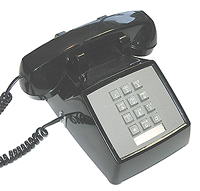
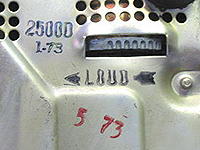
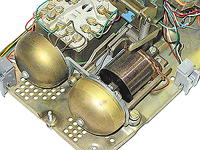
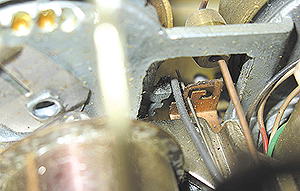
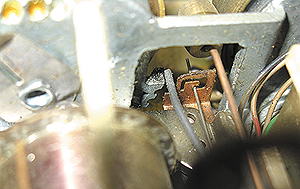
As a phone man the fact that the Magic Jack will ring a real 2500 set with just the voltage and current available from a USB port is totally amazing!
If your new phone (corded or cordless) doesn't ring with a Magic Jack, try this...
Some phones say 0.0 REN on the bottom of them, which essentially means they don't take any current from the phone line when ringing. If your phone says 0.0 or maybe 0.2 REN, try plugging a modular Y adapter into the Magic Jack, and plug in second phone that says 1.0 or so REN into the second jack on the Y Adapter.
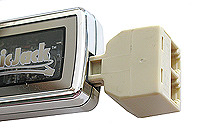
Some fake phone lines won't put out any ringing if they don't see any current being drawn. I haven't tested this on the Magic Jack, but it does work on other types of VoIP ATAs (Analog Telephone Converters) and phone systems.
More expensive professional solutions for technical geeks:
Our company sells a Loop Current Booster™ that will boost the loop current coming out of the Magic Jack to 27ma (from 12 to 16ma depending on Magic Jack version, which isn't enough to run some phones). It will let you make calls from any kind of analog DTMF phone anywhere in a house when put in-series with the modular jack on the Magic Jack.
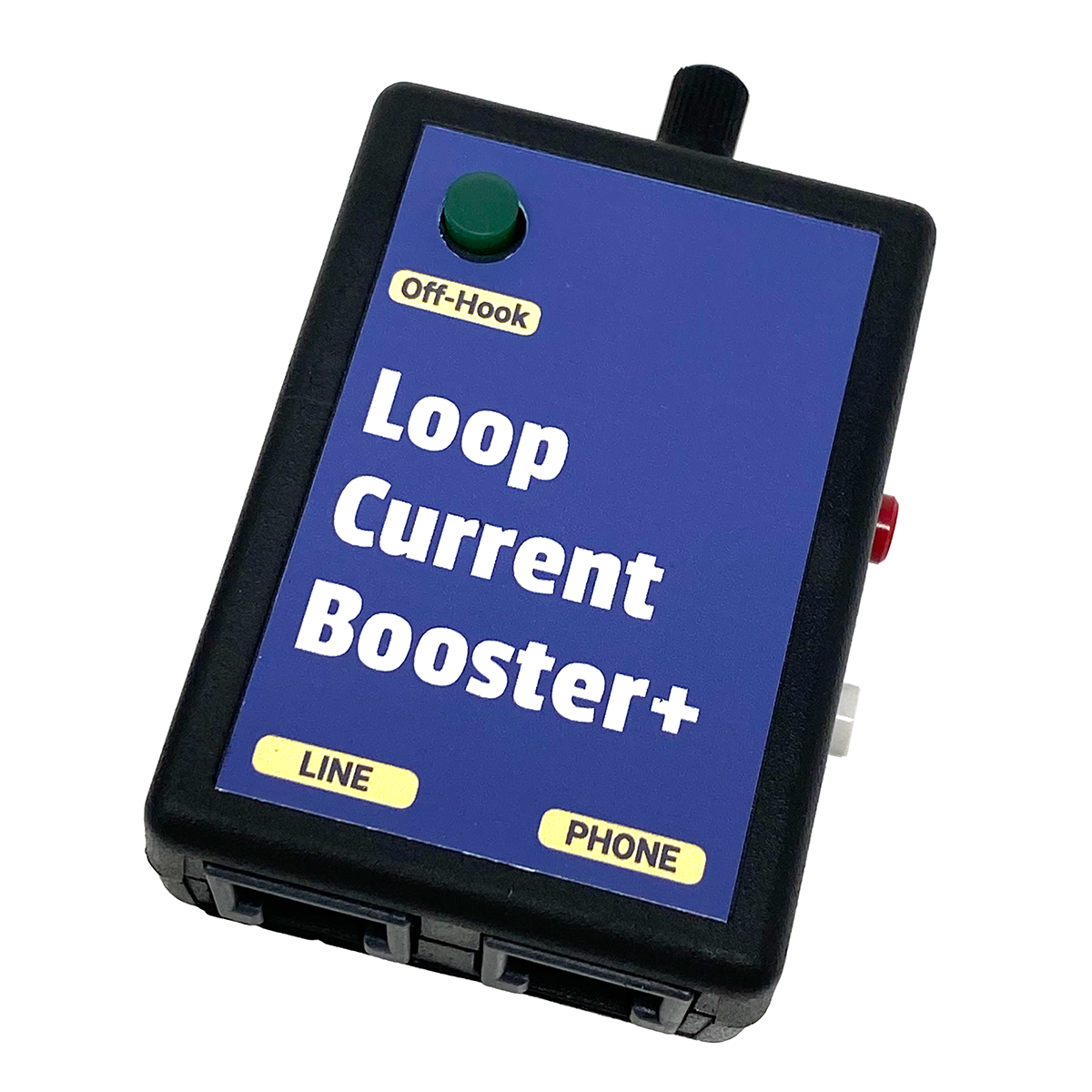
During testing, I found that the Loop Current Booster™ also boosted the ringing current enough to ring two phones with bells, as opposed to one phone with a bell without the Loop Current Booster™. The Magic Jack ringing waveform is a square wave (not a sine wave like from the phone company), which looks like pulsating DC to the Loop Current Booster™. The Loop Current Booster™ boosts one side of that AC square wave (which is actually a pulse of DC), so you get a little more ringing current when it's on the line.
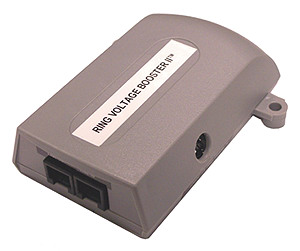
To get more phones ringing, our Ring Voltage Booster II™ gives you 90V AC sine wave ringing at 7.5 REN (the phone company only gives you 5 REN, which will ring 5 of the old style phones with real bells.).
There are 8 Versions of the Magic Jack that I've found (as of June 2015):
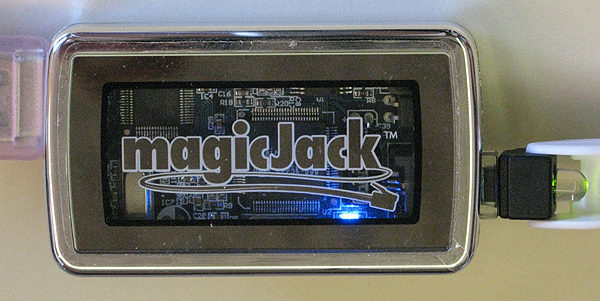
Version 1 - the original Magic Jack. It has the correct polarity coming out of it (see the green LED in the jack). The blue LED is on the bottom right. The easiest way to tell the difference between the three versions is by looking just above the J in magicJack. This version doesn't have much there. There is a vertically mounted chip (U1) a little to the right of the J, extending up (hard to see in this photo).
Here are the numbers for Version 1:
50VDC talk battery
4.1VDC off-hook battery
12.5ma loop current
85VAC ring voltage, but I also read 63VAC from one of the Version 1 Magic Jacks
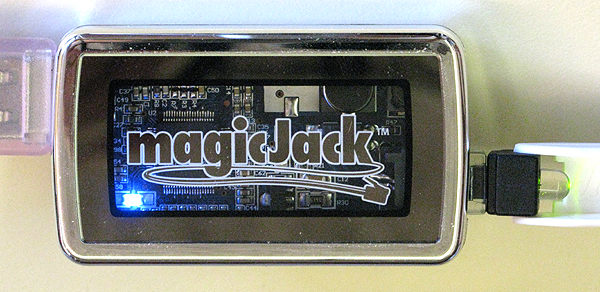
Version 2. It has the correct polarity coming out of it (see the green LED in the jack). The blue LED is on the bottom left. The easiest way to tell the difference between the three versions is by looking just above the J in magicJack. This version has a big white box with a solder blob.
Here are the numbers for Version 2:
38VDC talk battery
5VDC off-hook battery
15ma loop current
60VAC ring voltage - I couldn't find this version I could call into since you can't buy/sell a used Magic Jack (Robert Reite emailed that he measured 60V for the ring voltage on his Version 2)
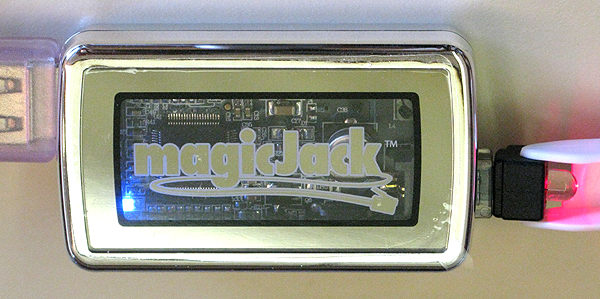
Version 3. It has the wrong polarity coming out of it (see the red LED in the jack). The blue LED is on the bottom left. The easiest way to tell the difference between the three versions is by looking just above the J in magicJack. This version has two horizontally placed surface mount components there (you can only see one in the photo).
Here are the numbers for Version 3:
38VDC talk battery
5VDC off-hook battery
15ma loop current
60VAC ring voltage
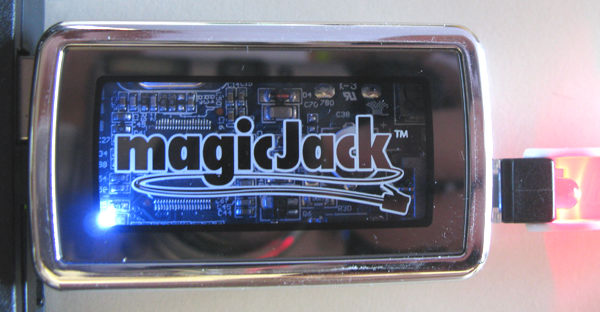
Version 4. I couldn't find a Version 4, but Brian Vanderheyden kindly sent me one that he wasn't using anymore. It has the wrong polarity coming out of it (see the red LED in the jack). The color of the bezel and logo looks different, but it is in silver and is just picking up the reflection of something between the Version 3 and Version 4 pictures. The blue LED is on the bottom left. If you look above the c in Jack you'll see some differences from Version 3, where there is a backwards UR mark, and an odd logo of something that looks like a flower above the k.
Here are the numbers for Version 4:
51VDC talk battery
6VDC off-hook battery
16ma loop current
Ring Voltage : ? - I couldn't find this version I could call into since you can't buy/sell a used Magic Jack. The ring voltage may well be higher on this version since the talk battery is higher than on Version 3?
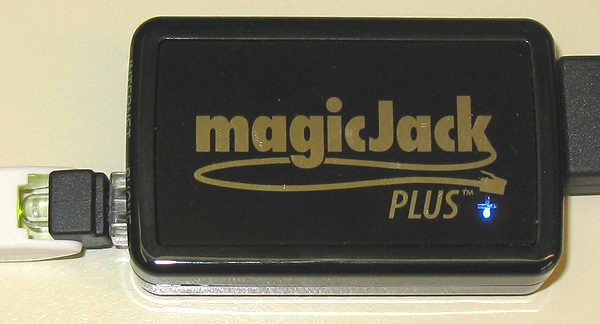
Magic Jack PLUS (2012). It has the correct polarity coming out of it (see the green LED in the jack). The blue LED is on the bottom right (under a clear + sign), and it no longer has a clear front.
You no longer have to leave a computer turned on to use it! You plug it into your computer via USB to set it up with your account, then you are given the option to remove it and connect it to your network (with no PC associated with it) or keep using it on your USB port. You can switch back and forth whenever you want (you may have to start the Magic Jack program manually when you plug it back into your PC).
This is a slightly bigger dongle, with two ways to connect it.
1. USB into a PC to keep it running - just like the old ones.
2. USB plugged into the included AC power cube, and an included network patch cord into an open port on your network (Ethernet) switch. There is no connection to a computer when used this way.
Here are the numbers for Magic Jack PLUS 2012... (same pitiful numbers as the regular Magic Jack):
50VDC talk battery
5VDC off-hook battery
16.5ma loop current
65VAC ring voltage
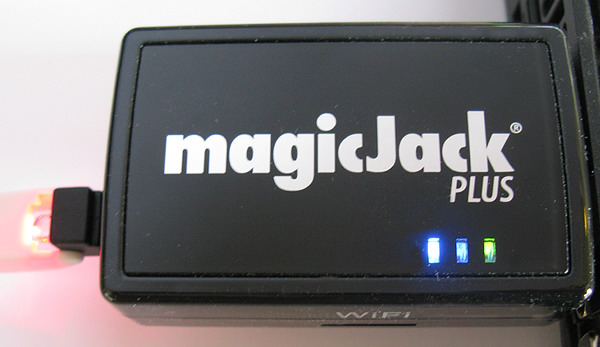
Magic Jack PLUS 2014. It has the wrong polarity coming out of it (see the red LED in the jack). There are now three LEDs on the bottom right. The case is still black, with no clear front. The WiFi slot and two USB ports (female) aren't used at this time. It might do something in the future with a firmware update, or in the next version?
You don't need a computer turned on to use it! You don't even need to plug it into a PC to set it up. You just plug it into a working Ethernet port on your Router, and power it with the included AC power cube to set it up.
I can verify that it didn't work when simply plugged into a non-powered USB hub using the Ethernet port (not a PC). It gave me dial tone but that's it. It worked almost immediately when I plugged the USB into the included AC power cube.
You can still use it with your computer's USB port. You can switch back and forth between your computer and an Ethernet jack whenever you want. Handy if you want to travel with it using your laptop (when it works).
The middle LED on the face is red. That seems to flash all the time when it it's working correctly, even though most humans figure a red light is indicating something bad. The blue LED seems to be for power. Not sure what the yellow LED is for, but it flashes when things are working OK (at a different rate than the red LED). There are also two LEDs above the RJ-45 Ethernet port on the side (next to the phone jack).
This is a slightly bigger dongle than the previous PLUS version from 2012.
Here are the numbers for Magic Jack PLUS 2014... (basically the same pitiful numbers as the regular Magic Jack):
46.8VDC talk battery
4.5VDC off-hook battery
15.8ma loop current
61VAC ring voltage (with 1 REN hooked up) - It still rings a phone with a mechanical bell just fine.
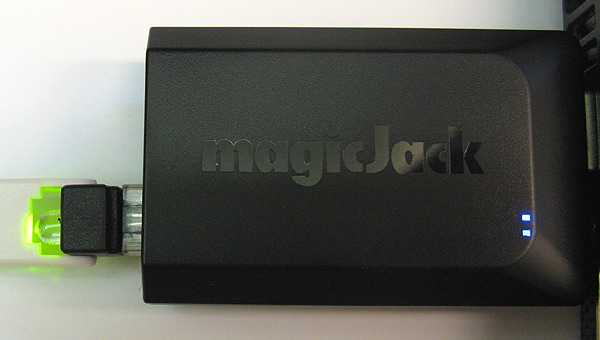
magicJackGO (2014). It has the correct polarity coming out of it (see the green LED in the jack). There are two LEDs on the bottom right, I think one is blue and one is white? It's a little smaller than the last PLUS, and is flat black instead of shiny black.
The WiFi slot and two USB ports (female) that were on the last PLUS are gone on the GO.
You don't need a computer turned on to use it! You don't even need to plug it into a PC to set it up. You just plug it into a working Ethernet port on your Router, and power it with the included AC power cube to set it up.
You can still use it with your computer's USB port. You can switch back and forth between your computer and an Ethernet jack whenever you want. Handy if you want to travel with it using your laptop (when it works).
The white LED seems to flash all the time when it it's working correctly. The blue LED seems to indicate power? There are also two LEDs above the RJ-45 Ethernet port on the side (next to the phone jack).
Here are the numbers for magicJackGO (2014)... (basically the same pitiful numbers as the regular Magic Jack):
51.4VDC talk battery
4.9VDC off-hook battery
15.8ma loop current
58VAC ring voltage (with 1 REN hooked up) - It still rings a phone with a mechanical bell OK. The bell sounds a little less loud on this version than the PLUS (at least with the bias spring in the high position).
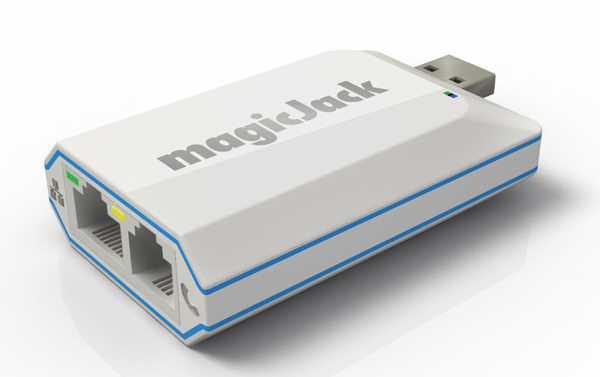
magicJackEXPRESS (2015). It looks the same as the MagicJackGO, but in a white case. I can't see any differences in it from the GO from the pictures. I might buy one some day to check the voltages.
The pricing seems to be less than the GO, probably because it only comes with 3 months of service?
Most phones are designed to work with a minimum of 23ma of loop current, although they will usually work at 20ma. Below that, things get pretty iffy. You might see strange and/or intermittent problems (you're a test pilot, because the engineers who designed your phone never tested it to work below 20ma of loop current).
You may have better luck using a phone that uses an AC power cube, since it uses regular AC power to run the internal electronics rather than getting power from the phone line. That's probably why cordless phone systems work OK on the Magic Jack (because the base is always AC powered).
Don't use the Magic Jack in a business, unless phone calls aren't important!
Ordering lunch or talking to a friend? Use the Magic Jack if the IT guy has allowed stuff like that on the network. Working on a million-dollar deal? Use a real phone.