


 View Cart
 Search Our Site
 Products
 Knowledgebase
 Company Info
 Contact Us
 Help
HelpTroubleshooting Caller ID Problems
You have to determine why Caller ID doesn't work before you can fix it!
Caller ID is 1200 baud data (modem data) transmitted between the first and second ring, in the US.
Caller ID can be delivered by different methods in other countries, so this bulletin only applies to US type FSK Caller ID. Other countries might use FSK data before the first ring, or DTMF tones before the first ring. In some countries they supply name in addition to number, but if it's DTMF type Caller ID, that can never have the name (it will just have the number).
If you have telephone equipment meant to be used in other countries, there may be an option to tell it to detect Caller ID between the first and second ring (US style), or it may not be compatible with US Caller ID at all (pretty unlikely if it's a phone system since the US is such a big market). Check the manual.
You absolutely need to carry a cheap known good battery operated Caller ID box in your truck for troubleshooting (with a good battery!) . You might be able to find a Caller ID tester on eBay like the phone company uses, or there may be a Caller ID display on some butt-sets, but it's not necessary to spend that money. Having an expensive tester isn't going to help you get the Caller ID working.
Caller ID is simply 1200 baud modem data. The information is formatted in one of two ways: With name (MDMF - Multiple Data Message Format) and without name (SDMF - Single Data Message Format), depending on how much the phone company is ripping you off for the Caller ID feature.
The only information delivered is the date and time (according to the Central Office's clock), the number, and the name (if you pay for it). If the number or name isn't known, it's replaced with an O or P denoting that it was Out-of-Area or Private (blocked), which is what's then displayed on the Caller ID box.
The data also contains a checksum (the CO adds up the ASCII value of all the digits transmitted and sends it as the checksum), which the Caller ID device calculates when it receives the message. If the calculated checksum is different than the checksum transmitted with the Caller ID, the box knows something is wrong with the data it received but it doesn't care (but it's available for special applications). It usually displays whatever data it has. If there's essentially nothing, or the line was answered on the first ring before the Caller ID data was delivered, the box will usually say, "No Caller ID."
If someone or an Automated Attendant answers a phone line on the first ring, the Caller ID that would have come between the first and second rings is lost forever. There's no way to get it back.
While Caller ID is delivered correctly from the CO most of the time, it might not be? One example is with older Centrex software on a Northern Telecom DMS-100 switch. Caller ID works fine with regular lines, but when they program a line with the Class of Service for a Centrex line, there is a bug that screws up Caller ID with Name (MDMF) that messes up the formatting of the Caller ID data, so a Caller ID box doesn't understand it. When they change the programming to send Caller ID number only (SDMF), the Caller ID works OK (with number only). If they change the Class of Service back to a regular line, both work OK. Since NT charges so much for the software for a CO (because of all the testing they do to make it bug free?), some phone companies may have never upgraded the CO with newer software, and you may still see this problem. Really tough to figure out.
There is one other type of Caller ID used in the US: Call Waiting Caller ID. That is also delivered as 1200 baud data when the line is in-use, and a new call comes in. It can only be decoded by special phones and Caller ID boxes that can hear the Call Waiting signal followed by Caller ID data during a call. When the phone or box hears the Call Waiting signal it's supposed to split the line so the user doesn't hear the burst of data, and then display the number of the new caller (after which the user can hookflash to answer the new call like regular Call Waiting).
Call Waiting should NEVER be put on a phone line on a phone system! Because a phone line can be put on hold, or the user can put the handset down on the desk while going to look something up, they won't hear the Call Waiting signal, and the new incoming call will never be answered. Unfortunately, your customer may be an idiot and may just decide they need another phone line, not want to pay for one, and will order Call Waiting themselves. A short while later you get a service call saying, "Incoming Callers are never being answered - they just ring and ring sometimes." If you get that service call, you may or may not remember to busy out all the lines and call in to make sure you get a busy (there is dial tone on all the lines). If you don't remember, you'll chase your tail for days/weeks/months (I speak from experience), and the customer probably won't want to pay you for all the T&M hours arguing with the phone company, etc.
If you let a customer talk you into putting Call Waiting or Call Waiting Caller ID on a line on a new phone system (some support Call Waiting Caller ID), you'll never live it down. Call Waiting and Call Waiting Caller ID is a great feature for home use (if you can afford the outrageous charges from the phone company).
The 1200 baud FSK that's used for Caller ID works very well in pretty horrible line conditions. 1200 baud is pretty slow, but you don't need anything faster for the small amount of data that's delivered with Caller ID. The other benefit to 1200 baud is that when used with a real modem, training is never used. For higher data speeds, you hear modems trying to sync up with lots of tones - that takes a while. There's no time for that with Caller ID, so 1200 baud is perfect since it's not used.
So, what can kill Caller ID?
If you have a mileage extension where a phone line appears at two different premises, and Caller ID works at one premise but not the other, go directly to #5 below. You probably have a bridge lifter on the line at the CO.
The good news is that not much can hurt Caller ID. It just plain works most of the time. When it doesn't work, it's pretty easy to check to see what's wrong. You absolutely need to be able to take measurements on the phone line with your meter. While you can call the phone company and just tell them that Caller ID isn't working, they're just going to send a tech out with a Caller ID box to see if it works. If it works, they put NTF on the ticket and leave. If it doesn't work, they still might do that. They don't care. They don't have to. They're the phone company (helps if you're old enough to remember Lily Tomlin's Ernestine the Operator).
When you're troubleshooting, swapping (or "frogging" or "rolling") the lines between CO line cards is a good first start, especially if stuff was working OK before. If you swap lines 1 and 5, and a problem on line 1 follows to line 5 (that was working OK and now line 5 doesn't work), you know there's something strange about that particular line that's now on line 5.
If you swap line cards in the KSU, make sure you mark them somehow before you begin. Gray tape that you can write on or tags with string (not wire!) come in handy. The cards all look alike and it's easy to lose track of what you've done, or you may put a bad card in back in-stock as a spare.
Generally speaking, if you find a problem with a phone line, you have a much better chance of getting the phone company to fix it (if it's really their problem) if you give them a direction to go in. This list should help:
-
1. No Caller ID programmed on the line from the phone company
It's certainly possible that the phone company screwed up the programming of the line. Put your butt-set on the line in monitor mode and listen to an incoming call between the first and second ring.
If you don't hear the burst of data, Caller ID isn't programmed on that line. Be sure to check all the lines! If some work and some don't, putting that on the trouble ticket at repair will help them because they'll be able to compare programming and engineering (how the pairs are configured) between working/non-working lines.
IMPORTANT...
If a person or an Automated Attendant / answering machine always answers on the first ring, you'll never get caller ID because it comes between the first and second ring.
-
2. Induced AC on the phone line
This is the #1 problem if you do hear the burst of data between the first and second ring!
When a phone line travels parallel to power cables, AC is induced onto the line. The farther it travels parallel to the line, and the more current is being drawn from the AC line down the road by a factory or large community, the more AC is induced.
A battery operated Caller ID box has no reference to ground, like a phone system or phone with a power cube has. Induced AC is common mode, meaning that the AC is exactly the same on the tip as the ring side of the line. Because there's no difference in the AC on the tip and ring, you can't hear the AC on the line with a butt-set or 2500 set... because there's no reference to ground. You will only hear AC (as hum) on a butt-set or 2500 set if there is more AC on the tip than the ring, or vice versa.
Since a battery-operated Caller ID box has no reference to ground, it doesn't hear/see the AC in its circuitry. Caller ID will usually work fine on the box even when it doesn't work on a phone system or phone with a power cube, since the phone system is referenced to ground through the AC power (the phone system may or may not have a ground on the cabinet or KSU).
Almost no phone equipment is perfectly balanced, that is that the tip looks exactly like the ring. Because the phone system is referenced to ground, if there is induced AC on the phone line the slight imbalance on the system means there is now more AC on the tip than the ring, or vice versa. Now you've got AC with its 60-cycle (and harmonics, like 120hz etc.) waveform in the circuitry on the trunk card, something that the engineers never tested with. It just so happens that the 1200 baud data is very susceptible to having problems when there's induced AC. Now you're a test pilot, and the manufacturer isn't going to help you because they assume you have a phone line without AC on it.
The first step is to measure the AC voltage on the phone line at the demarc (with the equipment disconnected) with a digital meter. NEVER USE YOUR METER FOR THE FIRST TIME WHERE YOU'RE HAVING A PROBLEM!!! Not all digital meters will read AC on a phone line, since there is also DC on the line which confuses some meters (the readings will be all over the place, and obviously not correct). Take readings at your house, your office, at other customers, so that you know your meter works and that you're doing it right. Using test equipment for the first time in the heat of battle can really waste time!
Measure the AC voltage from tip to ground, ring to ground, and tip to ring. In all cases it should be less than .5VAC (half a volt). If it's more than that, induced AC is probably killing the Caller ID. You won't know for sure until you get rid of the AC, but I'd say there's a 98% chance that getting rid of induced AC on a line will fix Caller ID problems. This is the #1 reason why Caller ID works on a cheap Caller ID box but doesn't work on the expensive phone system.
If you don't see more than .5VAC at the demarc with the equipment disconnected, put the bridging clips back down and measure it again. If it's a long run from the demarc to the phone system, somebody could have run the cable with the phone lines next to a power cable, and the induced AC can be coming from inside. You still have to get rid of the AC, wherever it's coming from.
Keep in mind that telephone cable should ALWAYS be twisted pair. When two wires are twisted into a pair, they naturally prevent induced AC, EMI and RF. When you put a phone line on two wires that aren't twisted, like the old "Jake" (red, green, yellow, black) wires, you are likely to get crosstalk and induced noise. The farther you go with untwisted cable on a phone line, the worse it will be.
If someone tried to double up pairs for some reason, using two tips and two rings for a single pair, that really wouldn't be a twisted pair and could lead to induced AC, noise etc. In telephony, you generally shouldn't use two pairs for a single line!
Likewise, if someone accidentally used the tip from one pair and the ring from another pair, it would also be susceptible to noise etc. Sometimes it's hard to tell the difference between colors in a 25 pair cable, so it's worth looking closely with a flashlight if you have a problem on your inside wiring.
Measure all the lines for AC! You want as much information as you can get when you're troubleshooting. If there is induced AC on only some lines, I'd sure be looking into why that's the case. If all the lines are coming from the same CO, they should all be the same unless the phone company ran out of pairs in the direction of a particular terminal and had to get there through other terminals. They could also be using pair gain equipment on some of the lines, which can give them up to 6 lines off a single pair. The pair gain equipment could also be eating the Caller ID?
Check out our Longitudinal Imbalance Tech Bulletin which explains exactly how to take the readings to determine if you have induced AC. There's a company listed in the Bulletin that has devices to get rid of AC on a line.
-
3. Imbalance / Noise
A phone line should ALWAYS be perfectly quiet when you dial a quiet line (a test line from the phone company, or your office with their phone muted). Mute your butt-set to eliminate background noise. Any amount of hum or noise that you can hear on your butt-set at the demarc with the equipment disconnected is not acceptable, and the phone company MUST fix it.
Guys keep calling me saying they only hear "a little noise" in their butt-set. A little noise is not acceptable! The phone company MUST fix it. If you hear a little noise, it can really screw up Caller ID on a phone system since it is referenced to ground - which could make the noise worse in the phone system's electronics. None of us have any way of knowing if that will fix your problem until you get rid of the noise you can hear.
If the phone company says they don't hear the noise when you report it, show the guy what you're talking about. The phone guy should have a meter that will read noise on the line, which will have markings for the maximum permissible noise. If you can hear the noise, it's definitely above that level. If this is what you do for a living, you should have a pretty good idea of what a normal phone line sounds like in your butt-set when you dial a quiet line. If you don't have the phone number for a quiet line in your area, ask around until you get one. You don't have to use the quiet line out of the CO the line is working out of (it's probably safe to assume the inter-office trunks are quiet).
Any noise, hum, static, RF or whatever you hear in monitor mode is meaningless. You can only test a line when you're off-hook, not in monitor mode. An unterminated line (on-hook) will have all kinds of clicks and pops, static, RF, hum etc., which mean nothing. The only valid test for noise is when the line is off-hook (terminated) with a butt-set or phone with no reference to ground. There should never be noise or static that you can hear in your butt-set when you're off-hook and the equipment is disconnected.
Hum and noise on a line can be caused by an imbalance. If the imbalance is on the line coming into the premise, there's nothing you can do about it, the phone company has to fix it, but you should know what an imbalance means: An imbalance means that the tip side of the line is longer than the ring side of the line, or vice versa.
Phones or systems that plug into AC are probably not perfectly balanced. The tip looks longer than the ring, or vice versa, in reference to ground through the AC power supply. They are balanced enough to not cause audible noise, but when they have induced AC that tiny imbalance can cause a problem. The engineers who design the systems always assume there is less than .5VAC on a phone line. Since a phone line "theoretically" isn't supposed to have AC on it, they don't even consider it when designing the system (not real smart, but they don't have much experience with phone lines in China where most phone systems are designed these days).
In telephony, the tip and ring ALWAYS have to be exactly the same length. When one side of the line is longer than the other, even by a few feet, it's likely you'll have audible hum or noise on the line that can affect Caller ID. If a phone line is always a full pair on cables from the CO to the premise, how can one side of the line be longer than the other?
• One side of the pair is shorted to ground (the tip of another pair, or earth ground)
• One side of the line is shorted to foreign voltage (the ring of another pair)
This often happens when there is water in the cable and there's a nick in the insulation on a conductor. Since water conducts electricity, it shorts one or both sides of the line to ground or to other lines. The water eventually dries out, and the problem clears until the next time it rains.
This also happens when a shovel or animal cuts into a cable and leaves shorted conductors, and an entry point for water.
When it happens on an aerial cable strung from pole to pole, it's usually an intermittent problem called a "swinger." When the wind blows the aerial cable, a nick in the cable is exposed to the carrier strand (ground), other cables, or even a big ass AC cable for a moment.
Another fairly common occurrence is that the line is bridged to another premise at one of the terminals in the field (where someone forgot to pull the jumpers after the previous subscriber was disconnected). If one of the wires going to that other premise gets broken, now one side of the pair is much longer than the other (imbalanced) - until someone finds the bridged wire in the pair and disconnects it.
Keep in mind that not hearing any noise on a phone line applies to real phone companies. At a true Rural Phone Company, which is a phone company that's subsidized by the FCC (and all of us) to provide telephone service to very rural areas, they can give you whatever they want. If you can make and receive a call with a 2500 set, essentially any amount of noise / voltage / hum / static / RF is acceptable. In those cases, you're just lucky you can make a phone call. It isn’t going to get any better at that premise unless they decide to use telephone poles rather than fence posts or trees to run the wires. That said, some Rural Phone Companies are way better technically than real phone companies, who could learn a thing or two from them!
-
4. Capacitance
Generally speaking, capacitance on a phone line kills data. It primarily affects data at 9600 baud or faster, but I suppose enough capacitance could mess with 2400 baud data.
Capacitance is essentially an AC (audio) short on the line, rather than a DC short on the line (which will kill a line pretty quickly). Capacitance is primarily caused by:
• Unused pairs bridged onto the line, usually going from a terminal to a previous subscriber's premise (hopefully unterminated there, so they can't listen in on your calls).
• Faulty phones or equipment on the line that has a lot of capacitance. Disconnect everything and if the problem clears, reconnect each device one at a time until the problem returns.
• MOV type lightning protectors An MOV (Metal Oxide Varistor) lightning/surge protector on a telephone line will probably put enough capacitance on the line to kill 9600 baud and up data. Phone companies never use MOVs, which will definitely eventually go bad and screw up the line. The phone company uses carbon or gas tubes which don't affect data speeds (unless they are defective).
If an Interconnect installed MOV type lightning protectors, that could be the problem. It's possible there could be a bad carbon or gas tube, but it's unlikely it would be bad on more than one line - which is why you want to test all the lines at the premise. It is possible that all the MOV protectors could be bad on all the lines! They all eventually go bad - probably all at close to the same time.
It's not a bad idea to wire around or remove lightning protectors, especially protectors installed by an Interconnect company, while troubleshooting. Be sure to put them back on the line before you leave! Gas tubes and carbon protectors simply go from ground to each side of the line. They aren't installed in-series, so simply unscrewing them with a can wrench will take them out of the circuit. Most protectors installed by an Interconnect will go in-series with the line (so there's over-current protection), so these need to be wired around - not just removed (which will kill the line). If they are a 66 Block type protector, you can just put bridging clips in place of the protector (temporarily!).
Bottom line, if you run into MOV protectors, replace them. They are all junk and will cause more service calls - even if they're not the cause of the problem on your current service call.
-
5. Bridge Lifters
A bridge lifter is only used on a phone line with a mileage extension (an extension), so the line appears at two premises in the field. It's essentially a relay that connects one of the pairs to the premise to the CO switch by default and disconnects the pair to the other premise... unless that pair is in-use, in which case it disconnects the pair to the other premise until the subscriber hangs-up. If both premises go off-hook at the same time, both pairs will be connected to the CO switch (essentially a conference call).
Because the bridge lifter defaults to one of the outside pairs when the line isn't in-use, and Caller ID always is delivered between the first and second ring when the line isn't in-use, only the default pair will get Caller ID if a bridge lifter is used.
The purpose of the bridge lifter is to remove all that unterminated cable going to the second premise when the other premise is off-hook, which prevents high capacitance and noise on the pair that's in-use (from the unterminated pair).
If you need Caller ID at both locations, you can ask the phone company to remove the bridge lifter. That will increase the noise on the line at both premises, but it might be OK if neither is far from the CO. If you need Caller ID at the premise where it's not working, but don't need it where it is working, you can ask the phone company to make the other pair the default - which will get Caller ID. The phone company may or may not have a clue about what you're saying (I'm being generous here). All you can do is keep escalating it.
-
6. Premise is too close or too far from the CO
There's nothing you can do about where the customer is located (most customers would ignore a suggestion to move so they can get Caller ID), or what pairs the phone company uses to get the line to the premise. The lines may be coming from the CO, Remote CO, from a SLC (pronounced "slick") a hut above or below ground in the neighborhood that's is connected to the CO by fiber or copper, which each subscriber is then connected to), or pair gain equipment which makes 2 to 6 lines out of a single copper pair when the phone company runs out of facilities to a terminal or the premise.
SLCs normally work as well as the CO switch itself. You could have a bad or mis-configured line card in the CO or SLC. Unfortunately, that'll be the last place the phone company looks after lots of service calls, meets and escalations - unless the line is just plain dead. The line cards have a way to option them, but the phone company assumes they're always optioned right.
The small pair gain devices are usually junk. If they're out of pairs, they do what they have to do to get you service (and won't always admit to using a pair gain device), but you could have lots of problems, including with Caller ID. Checking the on and off-hook DC, loop current and induced AC voltage readings on each line could point you in the right direction. If all the lines are coming from the same CO or SLC, the readings should all be almost exactly the same. If some lines read something very different, you can be pretty sure there's pair gain equipment involved. The Caller ID may not work on one of those groups of similar lines. Not much you can do about it except point out to the phone company that the readings you took are different on the lines that Caller ID doesn't work on - which might be enough to get them looking in the right direction?
One of the ways I've gotten rid of bad lines that just don't work right (when all the others do), is to order a new line from the phone company and when it's in and working correctly disconnect the old one (sometimes asking the phone company to change the phone number of the new line to the old line's number). That sometimes works once, but if you order a new line at some point after that, you may end up getting that pair that was giving you problems and might have to do the whole routine over again. That doesn't work if the phone company is using pair gain, because they're out of pairs and are just going to give you another line from the pair gain equipment.
If the loop current is low (below 23ma), you could try a Loop Current Booster™ which will boost the loop current to 27ma, and the on-hook voltage by 24VDC. It's pretty unlikely that it's a loop current issue, since the line is on-hook with no current flowing when Caller ID is delivered. The Loop Current Booster™ also adds 24VDC to the existing on-hook talk battery, which could conceivably make a difference to Caller ID delivery - but it's unlikely. Caller ID is just audio... audible tones sent from the CO that really don't care about the talk battery or loop current, but the phone equipment may care (which is why you should have a Loop Current Booster™ in your truck to give it a try).
Since the phone system doesn't try to collect the Caller ID data until after it hears the first ring, I suppose if the ring voltage was really low (or otherwise abnormal) it could fool the phone system. If it measures a lot less than other premises, you might try a Ring Voltage Booster™ which will boost the ring voltage to 90VAC in a true sine wave.
If you have high loop current, maybe over 35ma, you could try a Loop Current Regulator™ which will reduce the off-hook loop current to 25ma, but that shouldn't affect the Caller ID which is delivered while the line is on-hook. High loop current heats up components on the trunk card, sometimes to the point where they damage a component (in which case changing the card will help until that card burns up from high loop current). If the loop current is over 35ma, it's a good idea to use a Loop Current Regulator™ to get it down to 25ma so it doesn't burn up the trunk cards.
It's a good idea to carry a Loop Current Booster™ and Loop Current Regulator™ in your truck. In many cases, the only way to know if they will stop a particular problem is to try them. They really are diagnostic tools, as well as devices that fix problems.
Our Telephone line Diagnostic Table gives you a work sheet to record the various measurements you take on the phone lines, comparing the lines to each other... as well as to other premises where you didn't have a problem. If you're lucky, something will just pop off the page at you, and you'll have a direction to go in.
Low loop current would be indicative of the line being very long... a long way from the phone company's CO. Because 1200 baud data is very robust, it's unlikely the circuit loss on the line will be too high (low volume) for your phone system to hear it. It's possible, but rare. If the volume on the line was so low that the equipment couldn't hear the Caller ID signal, the volume would probably be too low for someone to talk on the line. Any 2 wire amplifiers for phone lines would probably only amplify when the line is off-hook, so I doubt they'd help if the volume was too low.
If there is an Impedance mismatch, it is possible that if you fix the impedance mismatch, the volume of the Caller ID signal will naturally come up. See item 7, below.
If the circuit loss on the line was too low (high volume), the 1200 baud data tones could be distorted - a lot like if you turn up the volume on a radio and it overloads the speaker, so it distorts. If the tones are distorted, they won't be recognized by the device trying to decode the Caller ID.
If the volume on the line was too high, it's likely it would also distort the DTMF digits and you may also have dialing problems or Automated Attendant DTMF recognition problems, since DTMF is very susceptible to being distorted when it's too loud (DTMF uses two tones on top of each other, rather than the single tone used on a modem). Even if the premise is close to the CO or a SLC, you'd want at least 3dB or so of circuit loss from the phone company (they send tone at 0dB from the CO, so you should see a -3dB at the premise). Attenuators are available to reduce the dB level on a phone line (which reduce the circuit loss, and the loop current at the same time).
I guess I should say there is something you can do if the lines from the phone company don't work... get a voice T1. Connecting a T1 line directly to a T1 card in the phone system will get rid of a lot of problems, but maybe create different ones. You won't be able to get a T1 at some premises because they are too rural, or they're out of pairs (no facilities) that will work for T1. Using a Channel Bank to convert the T1 to 12 or 24 analog ports to connect to analog trunks on your phone system will often give you a whole new set of problems.
-
7. Impedance Mismatch
Telephone equipment is designed to work on a 600-ohm or 900-ohm line. If the line is 600 ohms, and the equipment is 900 ohms or vice versa, there could be some distortion introduced and the volume of the Caller ID signal could be too low/high or distorted.
Sometimes the phone company puts devices called Load Coils (inductors) on the pairs from the CO to change the impedance, in order to make the audio on a phone line louder. Load Coils are only supposed to be used on a pair that's longer than 18,000 feet from the CO to the premise, and a minimum of three need to be inserted on the pairs for the line to work properly.
If Load Coils are improperly placed by the phone company, or there are too many or too few of them, the impedance of the line will be strange - which could cause volume, Caller ID and DTMF recognition problems. I also talk about this in our Echo Elimination and DTMF Tech Bulletin.
How do you know if the phone company has Load Coils improperly installed on the pairs? You don't.
How does the phone company know if they have Load Coils improperly installed on the pairs? They don't.
Technically speaking, the phone company's plant records should show which cable pairs have Load Coils (are "Loaded"). The reality is that the phone company's plant records are often not correct. Generally speaking, the phone company will put load coils on a whole binder at once, 25 pairs of a cable.
If they run out of pairs, they may give you a non-loaded pair. If you don't need a Load Coil, they may give you a pair that's Loaded because that's all they have left, and they don't want to remove the Load Coil. A single Load Coil or mis-placed load coil can really mess up the impedance of a phone line. Caller ID can be one of the things affected.
In general, the phone company will only put Load Coils on the pairs if you order a trunk (sometimes called "assured service") rather than a line. On a trunk, they do whatever they have to do to condition the pairs so you can hear OK on them - which may make the Caller ID work if it isn't.
A trunk can be loop or ground start. It just refers to how the line is conditioned from the CO. The maximum permissible circuit loss on a trunk is -5.5dB (which will sound great). The maximum permissible circuit loss on a line, which is cheaper, is -8.5dB (which makes the line pretty hard to hear). Caller ID should work fine at -8.5 if the impedance of the line and all other factors are OK.
Because you can't test for screwed up impedance, you're in a tough position if your customer is having problems. You really can't check for mis-placed load coils yourself (without spending a bunch of money). You can ask the phone company for a meet to find out if there are mis-placed load coils. You can ask them (in advance) to bring out a TDR (Time Domain Reflectometer) because you suspect mis-placed load coils, but the guy will likely show up without one. Maybe they'll bring it out on the second meet? Maybe they have one? Maybe asking your dog would be just as productive?
The phone man will connect the TDR at the premise, and look back towards the CO. The TDR will give him a graphical representation of every splice, connection, and half-tap on the pair (which can also cause Caller ID problems), as well as the first load coil. The TDR will show the feet to each squiggle (connection), which the phone man can then walk or drive to. The load coil has a specific squiggle (signature) on the graph.
Some TDRs can see past the first load coil to see other load coils on the line. If he has that type of more expensive TDR, the phone man will be able to figure out the length of the pair from the CO, check the records for that line to see if the pair should be loaded, and see whether the load coils that are on the line are where they should be - or if there's one or more that shouldn't be there at all.
Dealing with the phone company is probably as hard as it gets, since you're depending on the phone company to confirm your suspicion. The phone companies do OK at fixing a problem if you diagnose it and tell them what's wrong, but they don't do well at finding these kinds of problems themselves (mainly because they just don't care).
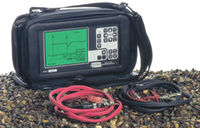
Riser Bond TDR There are two types of TDRs. The most common type can only see to the first load coil from the premise. Riser Bond sells one that will see all the load coils on the line. Neither are cheap. Riser Bond is at 800-688-8377. I don't think you can rent TDRs that will see past the first load coil, but if you just need to see to the first load coil, I think those are available at communications equipment rental companies.
If you think making the line into a trunk to make it louder will help, when you place an order at the phone company to change a line into a trunk they send the order to the engineering department, who calculates the length of the line and engineers the proper conditioning (where/if to put the Load Coils).
Because you're installing entirely new pairs to get the conditioning, they're going to charge you the full new installation charge for the change (will probably be an N order, not a C order). They'll install the new pairs to the closest terminal or to your demarc, test them, and if they test OK, they'll call Frames and ask them to change the jumpers on the frame at the CO to put your phone number on that new pair (so the customer isn't without service for long). They could also assign a new line card at the CO, and when the installer wants to cut it over, he'll call to get the programming ("translation") changed so the new line card has the programming for the old line (customer's phone number). The old pairs will then be unused and could likely screw up the next subscriber who gets them (the phone company doesn't care).
Paying the extra money each month for trunks or assured service can really solve strange problems at a premise. It can fix Caller ID as well as modem problems and low volume problems.
That leaves the problem of having an impedance mismatch between the phone line and the phone system. The phone company definitely doesn't care about that!
The only way you can adjust the impedance of a phone line is with an Echo Stopper™. Our Echo Stopper™ is an adjustable line impedance matcher. It will match a 600-ohm to a 900-ohm line, and match just about any mismatch you'll see with telephone equipment way over 900 ohms, and way under 600 ohms. Since there's no field type test equipment to let you test for an impedance mismatch, the Echo Stopper is one of those devices you should carry in your truck to see if it fixes your problem. You'll have to keep turning the knob from one stop to the other, a little at a time, to see if the Caller ID starts to work.
If there's an impedance mismatch, it's possible that matching the impedance will bring up the volume of the Caller ID to the point it would work in a marginal case. It could also take care of distortion if the line is too loud due to an impedance mismatch. In some cases, the Echo Stopper will make up for some of the impedance problems caused by improperly Loaded lines. The only way to know is to try.
Caller ID Spoofing
There are some technical details of certain types of lines that allow a caller to spoof their Caller ID. This can't be done from a regular POTS line from a real phone company, but there are some spoofing services that use these types of lines and special programming to allow someone to make a call through the service, substituting their Caller ID for that of literally any known number (which usually also sends the name for that number). Probably the most popular number to substitute for fun is the White House (202-456-1111).
There is a huge difference between Caller ID that's delivered on regular phone lines and VoIP lines, and the number that's delivered on an incoming 800 call on a T1 (ANI - Automatic Number Identification)... even though both give you the phone number of the caller.
Caller ID is delivered from the CO that originates the call, delivered to the receiving CO as a message on the SS7 (Signaling System 7) data network that parallels all the voice calls made in the US. It's up to the originating CO/phone company to send the number to the receiving CO - which is why whether you get the name/number or not on long distance calls is a crapshoot.
Within a LATA (local area usually served by a real phone company), both name and number are usually delivered if the caller didn't block the call (so it says PRIVATE - usually by dialing *67 before the phone number), and the recipient is paying for Caller ID number/name.
Outside a LATA, or on calls within a LATA from some VoIP providers or CLECs (fake phone companies), you could see only the number (even if you pay for name). Name isn't sent with the number from the originating CO. Instead, the name is added by the receiving phone company, who does a lookup in a database.
All the real phone companies belong to a club where they share a database of names associated with numbers. If you're not a real phone company (you're a CLEC or VoIP provider), you probably don't get to share that database. You've got to buy the database from someone. To save money, you probably don't bother, and just put OUT-OF-AREA (even if you send the number), or maybe substitute the state name the call is coming from (like ILLINOIS CALL). In some cases, there's no information sent with the call (usually from a CLEC or VoIP provider), so you'll see OUT-OF-AREA for both the name and number.
One guy told me that when he makes calls on his Magic Jack (it attaches to his computer so he can make phone calls), the name displayed to the people he calls is "Magic Jack" (I don't think that happens for everybody using a Magic Jack, or I would have heard about it a lot more). Not many VoIP providers will send your name on Caller ID, but some do.
If you pay Skype to make outbound calls from your computer to real phone lines (out call?) the number that's displayed is basically gibberish or more recently always the same fake number.
VoIP providers can do whatever they want. It's up to you to check out the type of Caller ID they send and receive - and whether it would hurt your business if it's not what you expected. You may not be able to find out what kind of Caller ID is delivered from a particular VoIP provider until you actually pay them to try their service. Even then, you may not get consistent results on all calls, or they may change the level of Caller ID they provide at their whim.
Incoming 800 calls on a T1 get ANI, not Caller ID...
An incoming 800 call on a T1 delivers ANI, not Caller ID. ANI will only give you the phone number, not the name. When the 800 number goes to a PRI (Primary Rate ISDN Line, which is 23 phone lines riding on-top of a T1) you usually get name and number.
Because the recipient pays for an incoming 800 call, the phone company long ago decided that there will be no way for a caller to block their number when calling a toll-free number. Dial *67, have permanent blocking, it doesn't matter. When you call a company's 800 number, they'll get your number no matter what... and some of them are going to make use of it.
As an example, when you get a credit card, they ask you to call in from your home phone to activate it. Not only do most credit card companies check the number against what you told them previously, but they add that number to the database if it doesn't match. If you don't pay your bill, they'll know where to call you. There's nothing you can do to block the number.
Many 800 numbers don't come in on a T1. They are basically remote call forwarded to a POTS number. The calls come in like any other call to that number, and you can't tell whether it's an incoming 800 call, or someone dialed the number. Since the original 800 call came with ANI, the 800 number provider has to:
• Convert the ANI to Caller ID
• Get the Caller ID number from the SS7 data that came along with that call, sometimes get the name from a database, and send that information as Caller ID (the name can be blocked)
• Do a little custom programming in their switch to take the ANI and send that number, and add the name from a database (the name is not delivered by ANI)
Most 800 number providers sending calls to a POTS number just send the SS7 data for the number and a name from a database. If the caller dialed *67 to block the call, you'll see PRIVATE. You'll still get the ANI number, but you'll have to look on your bill (or maybe on-line) to find the ANI for calls you answer that are PRIVATE.
Some 800 providers will send ANI (which can't be blocked) for the number, and name from a database lookup, which is the right way to do it. How do you know which ones will do it? I have no idea. The people working for 800 number providers seem stupider than the people working in customer service for the local phone company (if that's possible?). Asking them is probably a waste of time, but if you must... call them 10 times to see if you get someone who understands, and if you can get the same answer more than 50% of the time.
There's one other interesting piece of information you can get on an incoming 800 call on a T1 or PRI that's not provided on any other kind of line. It's called CLIP (Calling Line Identification Presentation). This is really the life blood of inbound telemarketing.
A call center has a finite number of phone lines delivered on a T1 or PRI. They may add or remove a whole T1 or PRI if it gets busy or slow, but they don't want to be placing orders for phone lines/phone numbers every time they get or lose a customer. CLIP gives them the 800 phone number that the caller dialed, which is basically remote call forwarded to the call center's PRI.
The phone system gets the CLIP phone number off the T1 or PRI, the agent's computer then uses that to do a screen pop for that particular call center customer so the agent knows that you want to buy a mop, and to answer, "Thank you for calling Happy Mops." The next call they answer could be for a shower cap. All they're doing is reading the script and order taking information off the screen in front of them - automated by the CLIP information. Their database also records the ANI so they can sell your information, after which a zillion telemarketers will call you for the rest of your life because they know you're a sucker who will respond to a TV commercial. If you call to donate to a "charity's" TV commercial, that'll really get their attention.
Local answering services normally have you forward your number to a DID number on their phone system. It could be coming in on real copper DID trunks, or on a PRI. Since you forward your call to a particular DID number, they get the DID line data from the phone system, they do a screen pop based on the DID line that call came in on, and they know how to answer the line.
Here's a piece of critical information about Caller ID you have to know to be able to help your customer:
When you forward a phone line, the Caller ID that shows up on the line the call has been forwarded to is normally the caller's number, not the number of the line that's forwarded. This means that just forwarding a phone line to the main line of an answering service is pretty much useless (the answering service won't know who they're answering for, but they'll have the Caller ID of the caller). This is supposed to be the way Caller ID works on a forwarded call.
There is a problem with this, though. Some phone companies don't care how it's supposed to work and show the Caller ID of the forwarded line. How do you know how it will work in a specific case? You've got to try it. Calling the phone company is probably a waste of time.
I've had guys call me who's customer just set up a fancy call forwarding scheme to cover after hours or whatever, and it all came crashing down because the Caller ID that displayed wasn't what they expected when they ordered everything. The phone company won't change what you see on forwarded calls no matter how nicely you ask (beg) them. The common answer from a phone company who is doing something strange or outside the norm is to say, "We're not required to do that" (the paperwork they filed with the state after they found out they screwed up says they don't have to do whatever you need them to do).
So, what can you do to make call forwarded calls display Caller ID as you need it? The only way I can think of is to use a "One Number Service." These companies specialize in helping small businesses look bigger. They normally will give you a number to forward your phone line to, which they will then make ring at a list of other numbers you give to them. Most can try numbers in order or make them all ring at the same time.
If they all ring at the same time, whoever picks up first normally has to hit a key to tell the service to give them the call - or to take a message on the included voice mail. Since all of these services are using PRI lines to dial out (which allows them to send whatever they want for Caller ID - more on PRIs further down the page), they often let you choose what you'll see for Caller ID when you receive a call (in a web control panel) - the caller's number or the forwarded number. Some will let you put in whatever specific number you want, or even append or prepend digits to a Caller ID number.
Many "One Number" services are small companies, some of them just reselling/renaming a larger company's service (they don't tell you that). Customer service and technical knowledge of what they're selling ranges from bad to total nonsense in India (the most likely tech support scenario). Most are looking for the "low hanging fruit"... the easiest customers looking for the simplest service. Most don't care whether you're happy or not, as long as you're stupid enough to pay them every month. Most make the people at the phone company or cable company look like geniuses.
NEVER port a phone number to a One Number service no matter what they tell you! They could easily disappear at any time, leaving you with no way to get your number back - and put you out of business.
The Magic of Caller ID on a PRI...
If you have a PRI line connected to a phone system, you get to program what's delivered as Caller ID!
Depending on the phone system make/model, when you have a PRI (ISDN Primary Rate Line) line you'll be able to program the system to send the Caller ID name and number of your choice. Normally, it's the main number of the company. Sometimes it's the number of a DID line that the employee answers, which is automatically determined by the phone system and sent with each call.
When you get a phone call from Caller ID 000-000-0000, that's because the phone system is programmed with that number (one of the first crooks to take advantage of this was "Miss Cleo" who called to sell you her "services"). If the phone man just left the outgoing ID field blank, you'd probably see Out-of-Area because no valid data is there. Since many people ignore calls saying Out-of-Area, programming in a fake phone name and number is more popular than programming nothing (if they program nothing for the name, the name field will say Out-of-Area, but the number will display).
Maybe you're seeing "ABC Motors" at "312-555-5555" for the Caller ID when they're calling to see if you need an oil change on the car you bought from them. The guy's name is Patrick, but he can hardly speak English and you've never seen him at the dealership. That's because the call is coming from an Indian call center who the car dealer is paying to make the calls for him to drum up business. The Indian (or whatever) call center has their phone system programmed to send the car dealer's name and number to be displayed for that call center account.
Maybe sometimes you see just see the area code as Caller ID, like 312-. Maybe you'll just see 1234, which is probably the person's four-digit extension number that's calling you. What you see is just what the phone man programmed into the system. If it's not a real phone number, it's a way of having privacy without sending the flag that says the call is blocked (because so many people ignore incoming calls that say PRIVATE).
I've noticed that the FBI, CIA and other "spy type" government organizations also block their number by sending just a few digits. These are the kind of guys where if you knew their number, they'd have to kill you.
By the way, it's illegal to send incorrect and misleading Caller ID (it's legal to block the call so it shows PRIVATE), but there are no Caller ID "police" so nobody cares. Since a lot of the calls with fake Caller ID are coming from Indian call centers, I doubt there are any kinds of police that could stop them anyway.
If you want to have a look at the Truth in Caller ID Act of 2009: http://www.gpo.gov/fdsys/pkg/BILLS-111s30enr/pdf/BILLS-111s30enr.pdf
Note that both a State's Attorney and the FCC can take action on this law. They obviously don't at this time.
Can you count on the Caller ID you see on your phone system or Caller ID box being correct? No. It'll be correct most of the time, but if you always believe what you see for Caller ID you can end up giving personal/business information to a scammer. The only way to be sure you're talking to who you think you are is to call them at a phone number you know is correct.
Want to spoof Caller ID without having to own a PBX with a PRI? You'll find companies offering the service on Google. You call their 800 number, enter a PIN number for your account, enter the number you want to display, and the phone number you want to call. They look up the name that goes along with that number in a phone book database and send both out as the Caller ID on a PRI on their phone system, automatically. It lets you get the benefits of having a PRI, without most of the expense and complication (they’re probably using the free Asterisk VoIP PBX which takes a real geek many days/weeks to get working right).
Think that spoofed call is untraceable? No way. You called in on an 800 number so they have the ANI for your phone number (that can't be blocked). Any of these companies are going to give the police the call records if they get a subpoena (and some will offer it without a subpoena).
If you get a business class VoIP phone line, you may be able to choose any number and name to be displayed for your Caller ID in an account control panel:
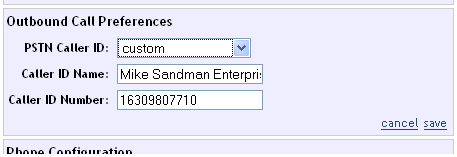
You'll notice in the control panel (above) that they want you to enter a 1 before the phone number you send for Caller ID (stupid idea since the 1 isn't going to be displayed!). I see a lot of mistakes made by phone men when programming a PRI to display a number, where they put a 1 before the area code. That's wrong on most phone systems, which will show 163-098-0771 on a caller ID box. In this case, I followed the instructions, and their VoIP service did drop the 1 and display the Caller ID correctly. You have to test anything you program!
Some VoIP providers have tried (or will try) to limit what a user can program in, so this may or may not work for you today or in the future.
This is probably more than you ever wanted to know about Caller ID, but if I didn't know this stuff there's no way I could have resolved all the Caller ID service calls I've gone on.
Do you have to know this stuff? No. But if you don't know where to find this information when you need it, you'll probably chase your tail for hours / days / weeks and look like an idiot to your customer.
Our Telephone Line Diagnostic Table will help you determine what's wrong with a phone line (compared to working phone lines), by taking some readings with your meter.
If you have a problem, you could call me and ask me to give you a magic fix, but I don't know magic. I'd just repeat what you just read in this Bulletin. It's the same thing I'd have to do if I was on the service call myself. Without the readings, how would I know?
I can give you one piece of magic advice... An incredibly high percentage of guys who call me start the conversation with "I replaced the KSU, and it's still not working."
Don't replace the KSU first to try to fix a problem! That's an expensive and time-consuming method of troubleshooting that seldom fixes a problem. It's not a very elegant way to do your job, and you can look pretty silly to the customer if they know anything about troubleshooting (stuff breaks and needs to be fixed in lots of different types of companies, and we're all in the same boat whether it's computers, machinery or whatever).